


 Deep Research
 Ask a bigger question. Get a report from your own AWS data.
Sherpa is an AI platform for AWS. Deep Research writes a decision-ready report on a strategic question about your AWS environment, with the numbers drawn from your own AWS data and outside sources linked.
After you sign up, a member of the Sherpa team contacts you within one business day to discuss your AWS environment and the right way to start.
How is this different from ChatGPT deep research?
General deep research
tools cite public web pages. They can't see your account, so their analysis describes AWS in general rather than your own workloads.
Sherpa Deep Research
works from your own cost, usage, security, observability and inventory data, plus any files you add. Web search is off by default; turn it on and the report also links the public sources it used, such as AWS documentation.
What's in a Deep Research report?
- 1
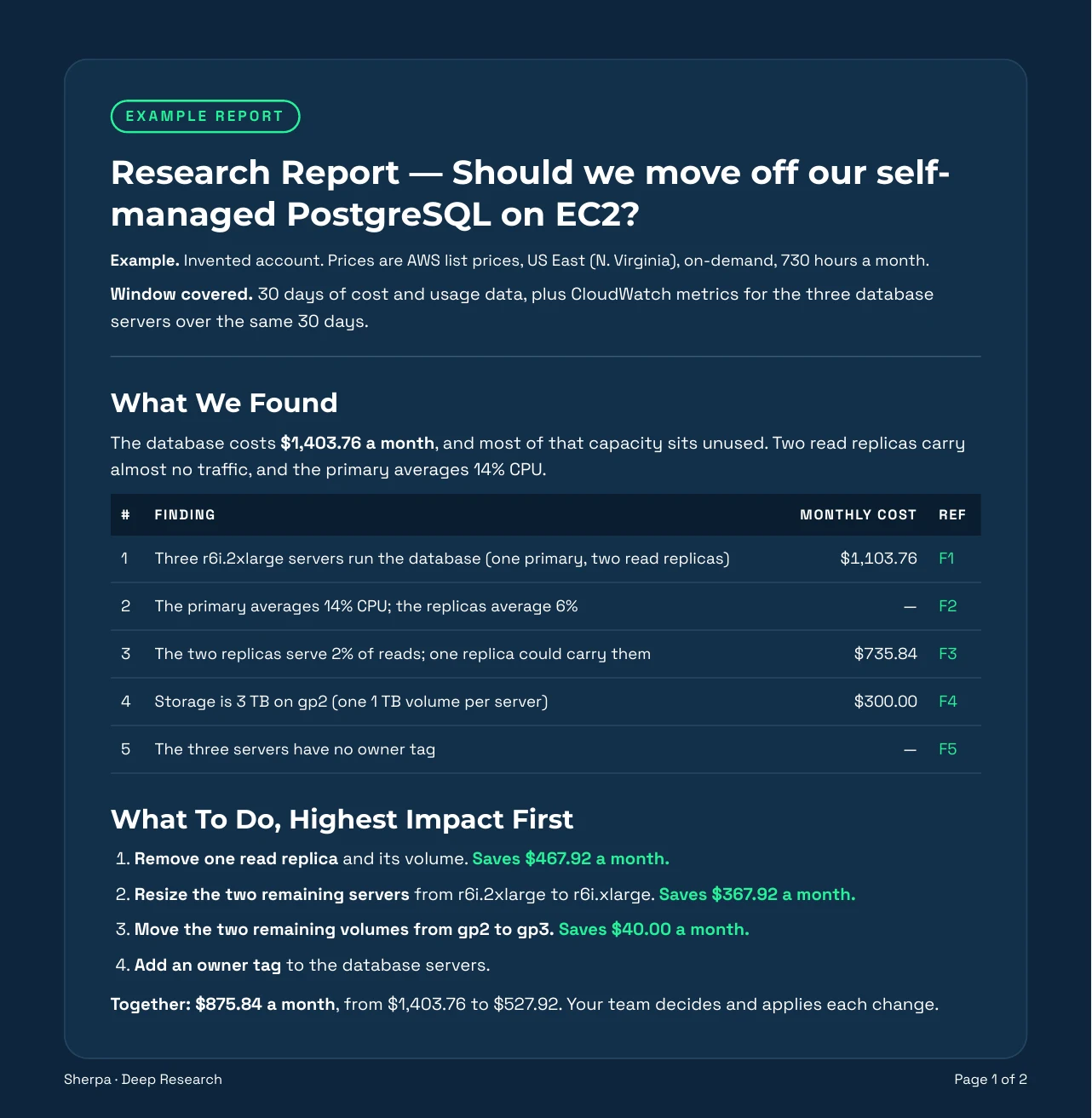
What We Found — the database servers involved, their monthly cost and their utilization, all drawn from your own AWS data.
- 2
What To Do, Highest Impact First — the recommended actions in priority order, ready for your platform engineering team to plan and schedule.
- 3
The Detail Behind Each Finding — the supporting evidence behind each finding.
- 4
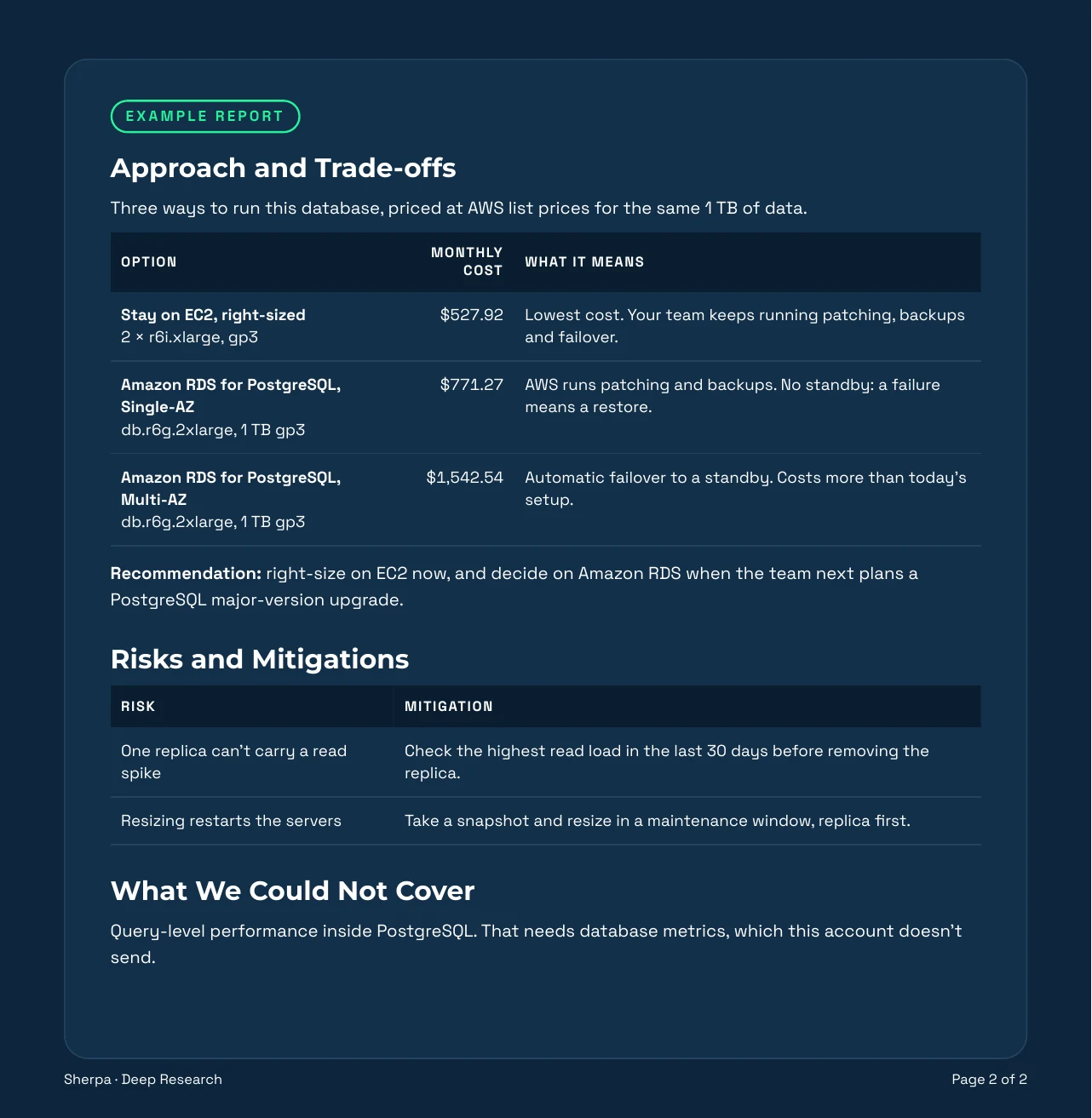
Approach and Trade-offs — stay on EC2, move to a managed database, or resize, and what each option means for cost, operations and risk.
- 5
Risks and Mitigations — what could go wrong during the migration, and the specific mitigations that reduce each risk.
- 6
What We Could Not Cover — the questions and data sources the analysis did not cover, documented explicitly.
Outside sources appear as links in the text when web search is on. Sections 3–6 appear only when they have content.
Read it in Sherpa or download it as a PDF.
Who reads a Deep Research report?
-
CTO
the architectural decision and the risks that come with it
-
Platform lead
the affected resources and the implementation sequence for the change
-
CFO
what the service costs today, and what it would cost after the change
What happens after the report?
Ask follow-up questions in Sherpa chat, which answers them from your own cost, security, inventory and observability data. The report points to where to act in Automate, and your team decides and applies every change.
Ask your bigger question.
After you sign up, a member of the Sherpa team contacts you within one business day to discuss your AWS environment and the right way to start.
Questions we get asked.
What data does Deep Research use?
Your own AWS cost, usage, security, observability and inventory data in Sherpa, plus any files you add. Web search is off by default; turn it on and the report also links the public sources it used, such as AWS documentation. Sherpa is an AI platform for AWS.
What's in the report?
Each report opens with what Sherpa found in your account and what to do, highest impact first. When relevant, it adds the detail behind each finding, the approach and trade-offs, risks and mitigations, and what the report couldn't cover. Read it in Sherpa or download it as a PDF to share with stakeholders.
How is it different from ChatGPT or Gemini deep research?
ChatGPT and Gemini deep research work from the public web, so they can explain AWS but cannot see your environment. Sherpa Deep Research starts from your own AWS account, so the figures in the report reflect your actual workloads, utilization and spend.
Does it change anything in my account?
No. Sherpa never applies a fix. It writes the report and the recommended steps; your team decides what to implement, and when.
What kinds of questions can I ask?
Strategic decisions about your AWS environment, such as migrating or modernizing a service, reducing one service's cost, or reviewing administrative access across accounts. Each question requires the relevant data area, such as cost or security, to be connected to Sherpa.
Still have a question?
Contact us